A campaign in the Marketing Cloud Campaigns app is a place for organizing content and messages so you or a team can plan, collaborate, analyze, and use workflows and approvals around them. An association is a channel-specific message, content, or activity you want to include in the campaign.
Campaign associations are cross-channel objects used to build campaigns. You associate these objects to a campaign to:
- Organize the associations needed to execute a campaign
- Plan messaging in the short and long-term future
- Act as parameters for analytics around a marketing objective
Add Assets to a Campaign from Campaigns tab
- Click on the Add to Campaign button in the upper-right corner of the screen.
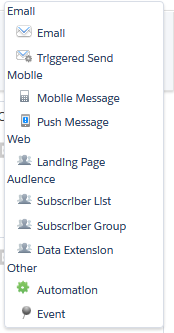
- Select the appropriate type of asset to associate from the dropdown.
- Navigate to the appropriate item(s) you wish to associate.
- Click to add item(s), then click OK.