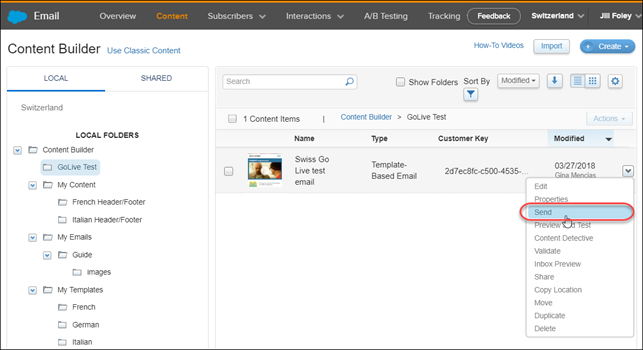
- Begin the live Send process.
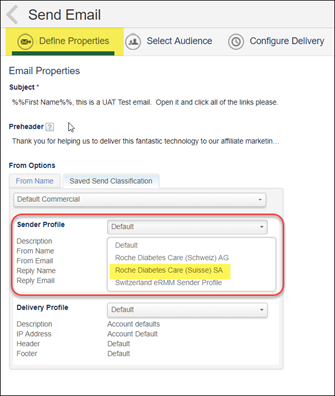
- In the first send screen, Define Properties, select the desired From Name under Sender Profile. In this example, I selected Roche Diabetes Care (Suisse) SA because I want to send the French version.
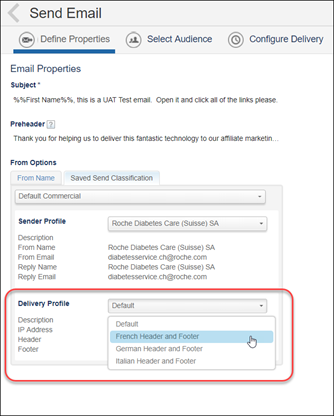
- Under Delivery Profile, select the desired language for the header/footer. Click Next.
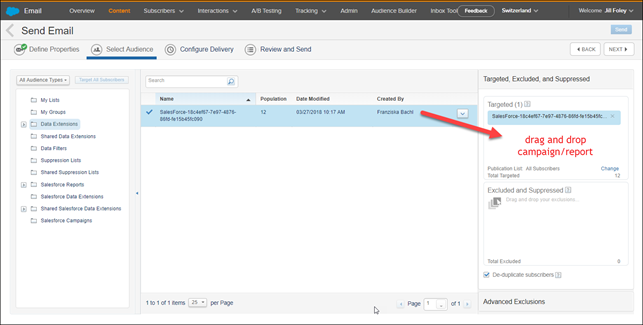
- Select the audience to receive the email by dragging and dropping it into the Targeted box. Click Next.
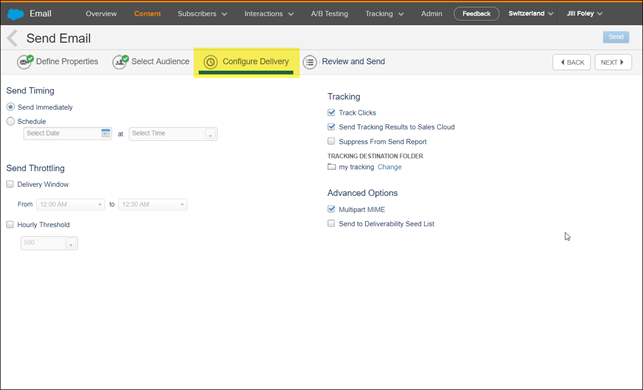
- In the Configure Delivery screen, make any applicable selections, can select Next.
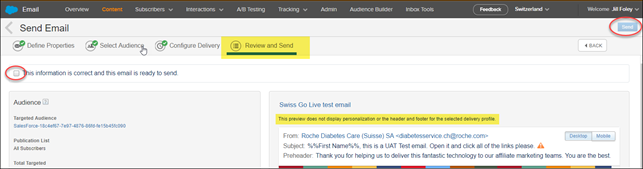
- On the Review and Send screen, review the details of your send.
Note: This preview does not display personalization or the header and footer for the selected delivery profile.
Therefore, the header/footer text that was selected under the Delivery Profile box does not display on this preview screen. The header and footer will populate at the time of send. - Confirm that everything else looks correct, check the box that says “This information is correct and this email is ready to send,” and click the blue Send button.
- You will receive a green confirmation message at the top of the screen indicating that the email was successfully sent.