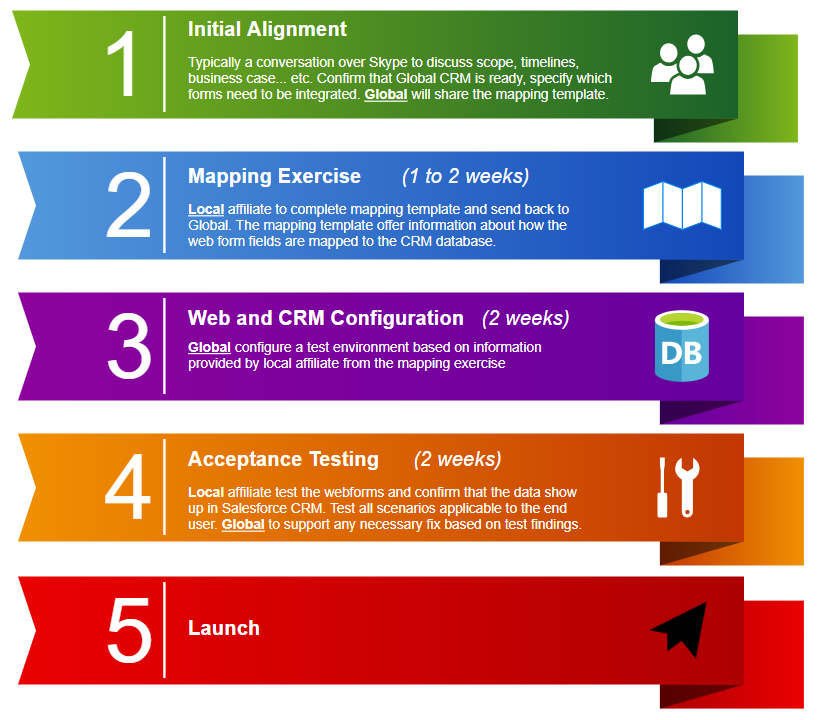
WCMS webforms can be configured to send user submission data directly to Salesforce CRM (SFDC Customer Relationship Management system). The integration will eliminate the need to manually import the data into Salesforce CRM. This feature is available in the Global WCMS platform, but will require some configuration before it is enabled.
The integration is limited to:
- Only customer registration(Account Object), device registration(Asset Object), Consent and Campaign Object.
- One way data push from website to Salesforce CRM, but not from Salesforce CRM to website.
- Only for WCMS websites, and countries that are using Global Salesforce CRM.
Before you contact the Marketing Operations Support Team, you need need to consider the following:
- Identify all WCMS webforms that require integration into Salesforce CRM. These are typically user registration forms, device registration forms, campaign forms, newsletter sign ups, contact forms. Prepare a list of URLs. If the webform is not yet published in your website, create a basic copy (i.e. content text) of the webform, and identify all the fields that will be in this new webform.
- Create a field mapping table.
- Map the fields in the front end web form to the CRM fields. We will need to know how the fields that the end user sees in the web browser, will be mapped to the equivalent CRM field.
- Specify the data type of the field. We need to know which formals can be used with the field.
- Send mapping table to support team, and a test environment will be created.
- After completion of testing with WCMS Stage site and Salesforce CRM RDCUAT, the production site will be updated with feature enabled.
- Production testing should be performed by country as the Global team does not have access.
(click on image to enlarge)