How to ensure our online content does not miss the mark.
Did you know?
- 50% of American adults are unable to read at an 8th-grade level. They can read some words and some sentences, but larger ideas and themes do not connect.
- The average reading age of the UK population is 9 years. The Guardian has a reading age of 14 and the Sun has a reading age of 8.
- People do not read the web. They scan. The average online users will read about 20% of your blog or article. If they do not relate to or find a headline or sentence that is interesting, we have lost them.
- The National Institutes of Health (NIH) recommend a grade 6-7 reading level for all health materials.
At Roche, highly educated people are everywhere. Many employees have Master’s degrees, extensive work experience, and tremendous diabetes knowledge. We also have “the curse of knowledge”. This means we unconsciously assume that others have the same understanding of diabetes, or terms, vocabulary, etc. that we have.
We want to produce content for patients and health care professionals that is truly helpful and meets their needs. However, we may be missing the mark. Listen to Austrian diabetes blogger, Anna Pintsuk (@onne-pe.com).
“Specifically for people with diabetes, I have heard many people say that communication from diabetes brands is often “out of their league”. We want you to communicate with us in a way that feels approachable and on our level. Some patients are self-conscious and feel “not smart enough” to understand Roche Diabetes communications. We are not used to reading press release-like material.”
“If Roche Diabetes Care talks the way it usually does, you will unintentionally increase stress levels and the opposite of what you intend – which is to provide relief.”
In short, Roche content authors and reviewers are not representative of our readers. We have to rethink our approach to online content! How do we create content that is helpful, provides relief, and ensures that we are not speaking “over (or under) their heads”?
How to Write for the Web
Answer a question
Just placing content on the web doesn't mean it will be "good content". Good content serves a purpose. It answers a question, meets an emotional need, and aligns with brand. Start by aligning your content with the questions (keywords) that users are typing into the search engine. If you need help understanding what those keywords are, contact us.
Focus on Readability
What is Readability? Readability is the ease with which a reader can understand written text. This relies on both the words and design. Readability scores measure how likely it is that the intended reader will easily understand our written information. Writers should aim for readability score of 8th grade or lower. Note – THIS IS NOT DUMBING THINGS DOWN. This is focusing on ease of communication and using creativity to get there.
How to make you content more readable.
- Write short sentences. More sentences are better than longer sentences.
- Use the less-complex versions of common words. Choose words that our customers use.
- Make paragraphs shorter. Chunk up paragraphs into single ideas.
- Include lots of headings – see below for more.
- Test your readability and then rewrite if needed
Check the readability of your content while you write.
Here are some free tools we can use to assess readability.
- Microsoft Word has a reading score tool built in. To use it, just go to Review >> Spelling & Grammar. Go through the spell-check. When it’s finished, the final screen will display lots of extra information about your text, including the various readability scores.
- Readable scores your text against several readability algorithms so you get a bunch of different scores, plus a grade from Readable’s proprietary scoring system. It also points out the hard-to-read text so you can refine it.
- Hemingway Editor uses the Automated Readability Index. It is a visual editor that highlights sentences you can split or shorten. The app singles out very complex sentences. It also picks up long words, offering alternatives. And you can use the app to find passive voice and excessive adverbs.
For example, look at these text snippets and the before and after readability scores.
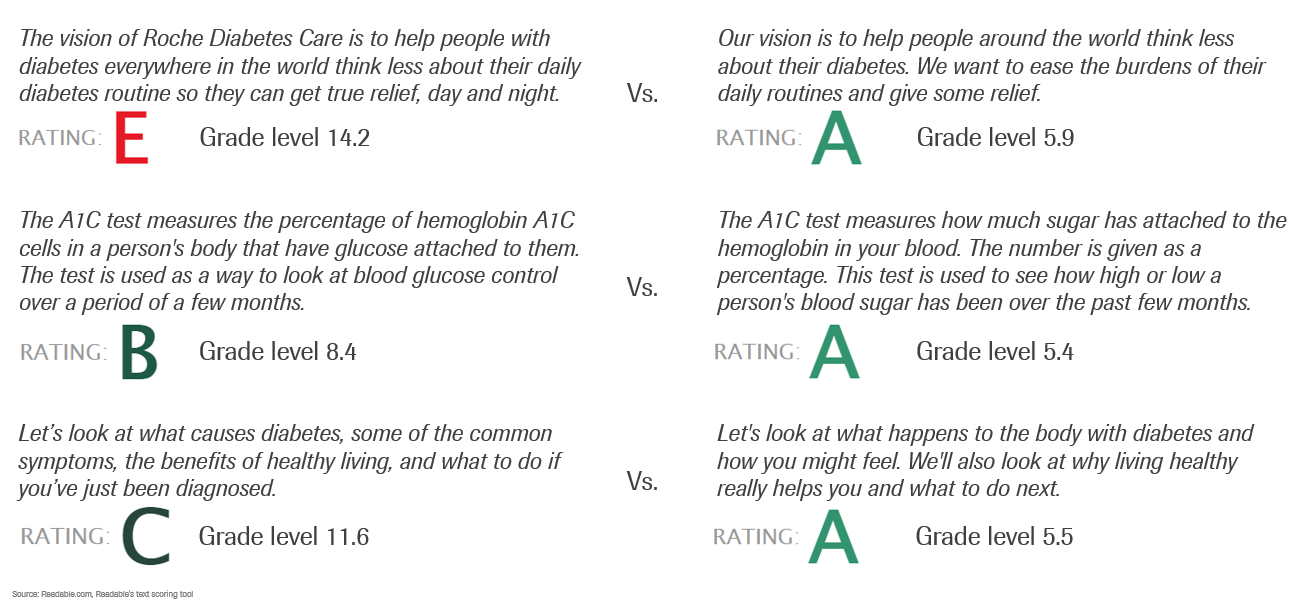
Lastly, focus on content construction for the web.
Google is scanning and trying to understand our content as well. Web pages have to use scan-able text. Including headings, descriptions and bullets will help search engine process our content.
- H1 Tag - should only be used once for your headline/title.
- H2 Tags - are for major subtopics within your content piece.
- H3 Tags - break down facets of your subtopic(s).
- Image descriptions
- Add a short synopsis for Google
- Bulleted Lists - Google loves them
Author’s Note – Just so you know. I used these same techniques in this very article. I wrote shorter sentences and cut out more than 100 extra words. I changed passive voice sentences to active voice and reduced the grade level from 7.8 to 7.0.
Want to learn more? Check out these other articles: