The Tightrope: Depth v. Breadth
“Perhaps too much of everything is as bad as too little [of nothing].” - Edna Ferber

Social Studio gives us the ability to hear and join into any discussion being held online at any moment in time. However, at some point, the abundance of voices turns into noise and it is hard to clarify which conversations we really need to be listening to.
In this week’s #socialtipsandtricks we will address keyword groups and the fine line between too little, and too much.
When working with your team and brainstorming a list of terms that you wish to monitor through Social Studio, there are a few Best Practices that you should keep in mind!
One keyword can replace an entire list. An affiliate recently submitted a list of keywords to add to the Global Diabetes topic profile so that they could listen more effectively. The list below is a small sample of what was submitted.
- Sensor de glucosa
- Sensores de glucosa
- Sensor de la glucosa
- Sensores de la glucosa
- Medidores de la glucosa
- Medidor de la glucosa
- Medidor de glucosa
- Medidores de glucosa
What should be noted, is that “glucosa” is in every line item. Their list could have simply listed “glucosa” and Social Studio would have generated the exact same results. You may ask, then how would I find specific content on “sensor de glucosa?” Very easily- simply refine your results by that keyword in your main dashboard. Follow the steps below!
- Click on the filter option in your dashboard.

- Enter in your specific keyword in ‘Keywords.’
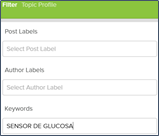
- Click ‘Apply.’

You should now be able to successfully narrow your results to gather precise insights. However, in this example when I applied the “sensor de glucosa” keyword term, Social Studio generated zero results. As a user, I have two options. Re-enter my keyword as just “glucosa” which populated 59 results- or – select a broader date range which returned 2,000 results. This is where the tightrope balancing act of depth and breadth come into action!
A general keyword populates unnecessary noise. Another keyword list that was submitted through a support ticket suggested that we add the term “dmg” to the Global Diabetes topic profile. After adding the keyword and double checking our work, we noticed a 6,000 post spike with the Media Trend Type tool on October 19th for the region.
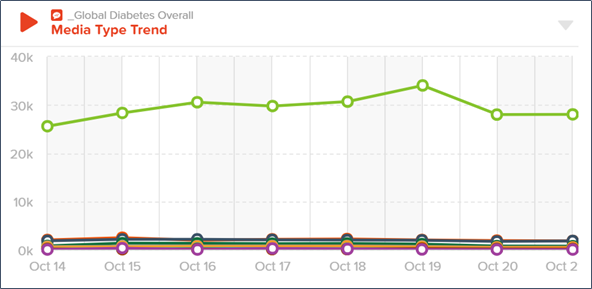
Because this is a noticeable difference in daily activity, the team began to research what happened on that day. Here is what we found with the Top Words tool.
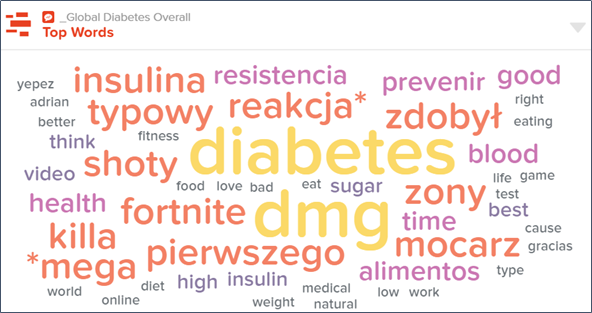
The top words for the day indicated terms that are not typically associated with healthcare. By simply clicking “fortnite,” the team noticed that that term is an online video game. Now, we have to determine which keyword is dragging “fortnite” into our results. “dmg” or dimethylglycine, is an acronym associated with diabetes. “dmg” is also a term related to the video game which is an abbreviation for the word ‘damage.’
To correct the social noise and tidy our results, the GMO team added the word “diabetes” and “dmg” to the keyword group which then generated the Top Words results below. You will see that the change quickly removed the video game from our search.
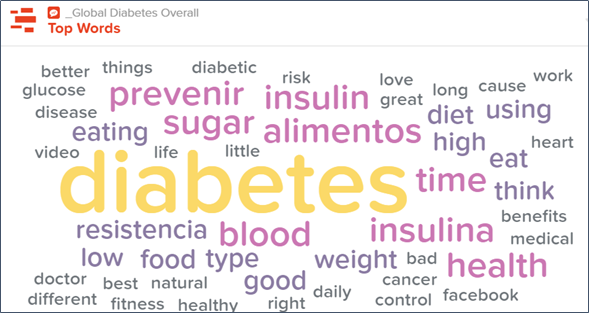
This looks to be more accurate of the insights the affiliate team was looking to review.
So what happens from here?
- When brainstorming a list of words that your team is wanting explore, ask everyone aloud if the term is too broad or too narrow.
- Quick Tip- Acronyms, or abbreviations, are usually too broad. Keyword Terms over 2 words are too specific.
- If you are seeing the same word listed repeatedly, one term can replace them all, then your team can filter to a desired result.
- Error on the side of being too general. It is easier to refine, filter, and correct, than to have a limited amount of results returned. This can lead your team to feel frustrated and confused with Social Studio.
- Remember to allow your team time to get familiar with the dashboard. Social Studio is a mix between an art and a science. Automation is great at doing the heavy lifting for our teams, but human interpretation is needed to fully understand what the results are trying to say.
As always, reach out through Support Form or email if you have specific questions related to Social Studio, keyword groups, or general questions!