Cache’s help improve website performance (speed of the server responding to your browser request, like how quick your web page will load). Clearing them would impact performance for a duration of time, until the cache is rebuild again.
WCMS servers clear cache on a periodic basis, to ensure the latest content shows up. If you are changing your website content, you may want to clear cache manually rather than waiting for the server to do so. You may want to do this to verify that the changes you made in the Administrative portal, is per your expectations.
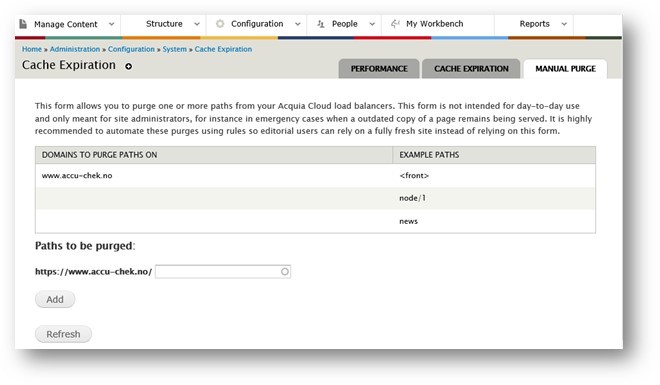
You can clear cache through our "Manual Purge" option <https://www.accu-chek.your-url>/admin/config/system/expire/manualpurge; or within the Admin portal navigation, you can find it under “Configuration > Clear Cache > Manual Purge”.
There is also a feature to clear cache for CSS, JS files under <SITE URL>/admin/config/development/performance/cssjscacheclear
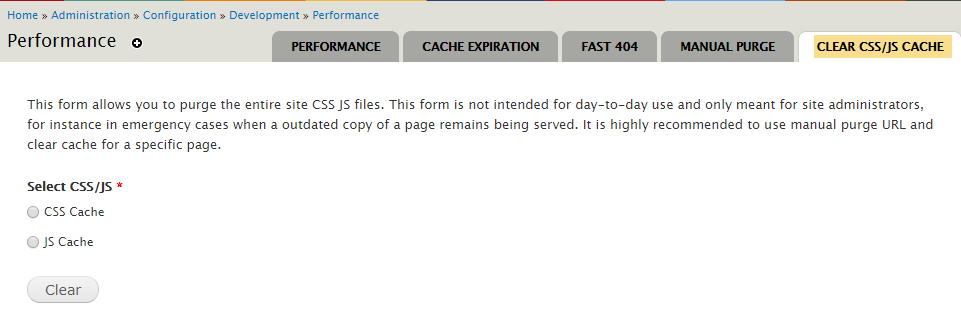
Please utilize this feature in moderation, as frequent manual cache purge(s) will impact site performance temporarily.
If you have questions about this feature, please submit a ticket to connect with a website support team.