|
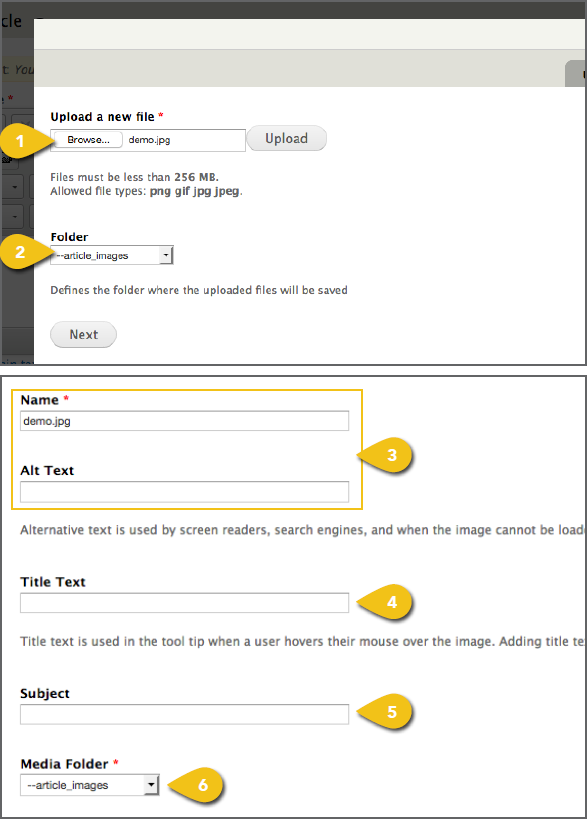
You may upload a local image from your 1. Click the Browse or Choose File button 2. Under Folder, select Product Images from 3. Enter the image Name and Alternate ! This text is used by screen readers and search engines, and appears any time an image cannot be loaded. Adding alt text improves accessibility and search effectiveness. 4. Enter the image Title Text. ! Title text appears when a mouse hovers over the image. This provides context and improves usability. 5. Enter a general Subject for the image, to 6. Under Media Folder, confirm that the |
 |
|
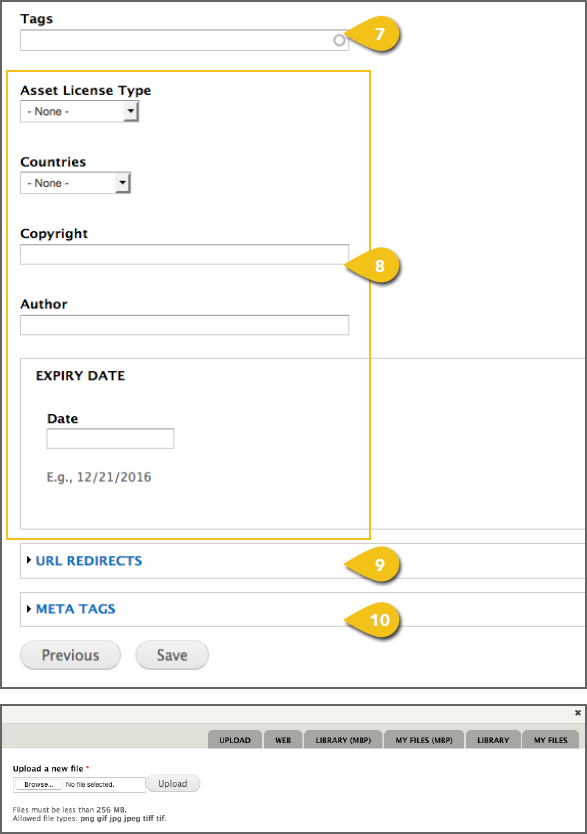
7. Input any Tags or keywords that might aid 8. It’s recommended that you leave the Asset ! Do not enter an expiration date unless all uses of this image will be expired by that date, or the image may not appear on other pages as expected. 9. Add URL Redirect details, if you have any 10. Add page and content Meta Tags to aid in Select An Existing Image To use an image already loaded into the |
 |