Watch the how to video (3:11)
In a journey, contacts can go through once or many times. Contact re-entry mode determines when and if a patient can re-enter a journey.
- Hover over Journey Builder and select Journey Builder.
- Navigate to and select the journey you would like to modify.
- Select
 from the top right of the toolbar.
 - Select Journey Settings.
- Select a contact re-entry mode. Note: These hold true for multiple versions.
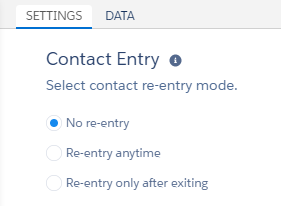
- No re-entry: Contact will never go through journey again. Ex. Welcome Journey
- Re-entry anytime: Contact will enter anytime it passes the filter. This provides no control over entry. Ex. API events, Purchase Confirmation journey
- Re-entry only after exiting: Contact will enter if it is not currently in the journey. This setting admits a contact into the journey when that contact meets filter criteria, if applicable. However, the system does not readmit that contact into the journey until after that contact exits the journey Ex. Survey after a service call journey
- Select Done.
- Select Save.
Congratulations! You have successfully managed contact re-entry into a journey.