|
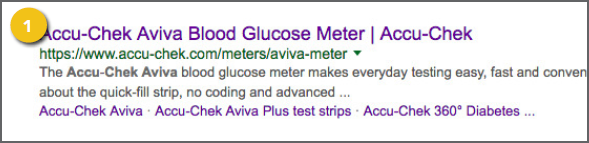
Unseen on your Web pages, meta tags are ! Titles and descriptions are especially 1. Page Title: Displayed in the title bar 2. Description: Include a brief summary of 3. Abstract: This concise summary of the 4. Keywords: You can include a comma-separated |
|
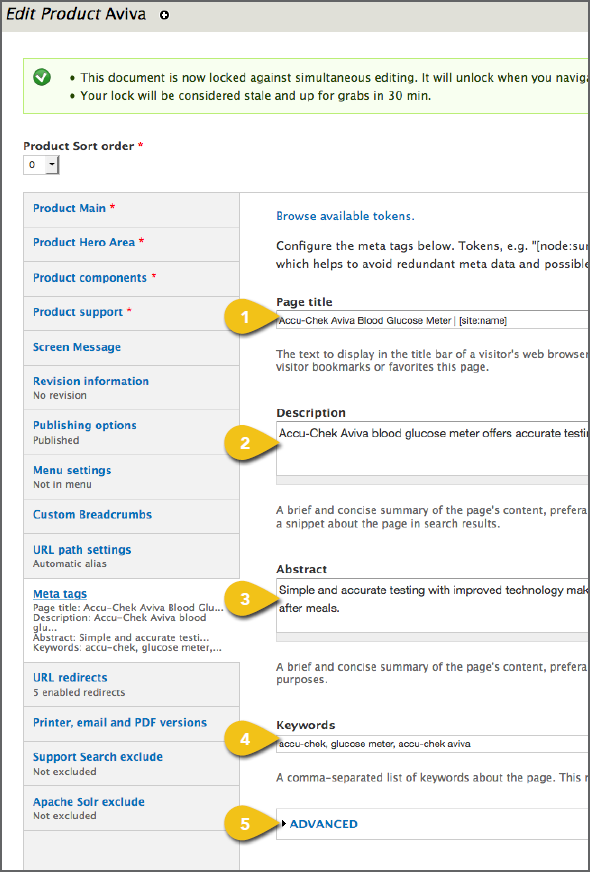
5. Advanced
a. Robots: These provide search engines with specific directions for what to do when this page is indexed, including:
• Allow or prevent search engines indexing the page (“allow” is assumed).
• Allow or prevent search engines following page links (“allow” is assumed).
• Prevent cached copies of the page from appearing in search results.
• Prevent descriptions from appearing in search results, and prevent page caching.
• Block the Open Directory Project description from appearing in search results.
• Prevent the page from being listed in the Yahoo! Directory.
• Prevent search engines from indexing images on the page.
• Prevent search engines from offering to translate this page in search results.
b. Google News Keywords: A comma separated list of keywords for use by Google News.
c. Google Standout: Great for breaking news, this is used to alert Google News.
! Do not abuse this tag. It can be used a maximum of 7 times per calendar week.
d. Content Rating: Indicate the intended audience.
e. Referrer Policy: Indicate to search engines and other page scrapers whether links should be followed. See the W3C specifications for more information.
f. Rights: Details about intellectual property, such as copyright or trademarks. Note that this does not automatically protect the site’s content or intellectual property.
g. Image: Identify an image associated with the page for use as a thumbnail in social networks and other services. This will extract the URL from an image field.
h. Canonical URL: Preferred page location or URL to help eliminate duplicate content for search engines.
i. Shortlink URL: A brief URL, if you would like to include one created by a URL shortening service.
j. Publisher and Author URLs: Used by some search engines to confirm authorship of the content on a page. Should be either the full URL for the author’s Google+ profile page or a local page with information about the author.
k. Original Source: For shared content, this can be used to credit the URL that broke the story. It can link to an internal URL or an external source. If the full URL is not known, it is acceptable to use a partial URL or just the domain name.
l. Previous Page and Next Page URLs: Good for helping users navigate paginated content. Google provides instructions for naming URLs to indicate paginated content.
m. Revisit After Interval and Revisit After Interval Type: Tell search engines when to index the page again. Very few search engines support this tag, so it is more useful to use an XML sitemap file.
n. Content Language: No longer recommended, as this tag is out of date.
o. Geo Position or ICBM: Geo-spatial information in “latitude;longitude” format, e.g. “50.167958;-97.133185”. See Wikipedia for geotagging details.
p. Geo Place Name and Geo Region: Include your location’s formal name or two-letter international country code, with an optional two-letter region, e.g. “CAON” for Ontario, Canada.
q. Refresh: The number of seconds to wait before refreshing the page. May also force redirect to another page. For example, “5; url=http://example.com/”, would redirect after five seconds.